
DENFest mobile app
Get the most out of DENFest with the UniLeeds app. Access event information all in one place, including: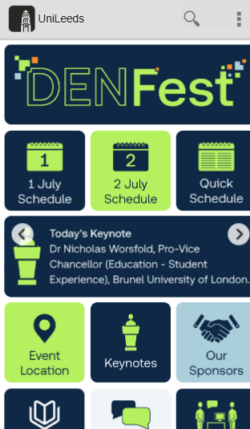
- Quick reference event schedule
- Venue and accessibility information
- FAQs and contact details
- DEN Zone opening times
- Opportunities to engage
Download the mobile app
You can download the UniLeeds app from the Google Play Store or the Apple App Store
Access the web-based app
You can also access the DENFest app from a browser at https://unileeds.leeds.ac.uk
Select a profile
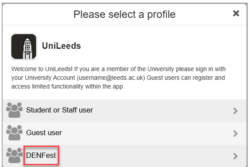
- If you’re accessing the app for the first time, you’ll be asked to select a profile. You will need to select DENFest from the list.
- If you've used the app before, you might need to change the profile settings. Go to Settings, then Switch Profile and select DENFest.
- If you can't see the DENFest in the list of profiles under Switch Profile, please go to Settings then Logout. Once you've logged out, the list of profiles will refresh and you will see DENFest as an option.
Questions about the app?
If you have any questions about DENFest or the app, please contact [email protected]
